Start page
This is the first page that users will see when they enter the service. They will typically arrive from the CPS website.
The start page is divided into 4 sections:
- who the service is for
- what users will need to create an account - we only list information which they’ll probably need to look up
- how to make an application - this section includes a green start button for the service
- when users can apply
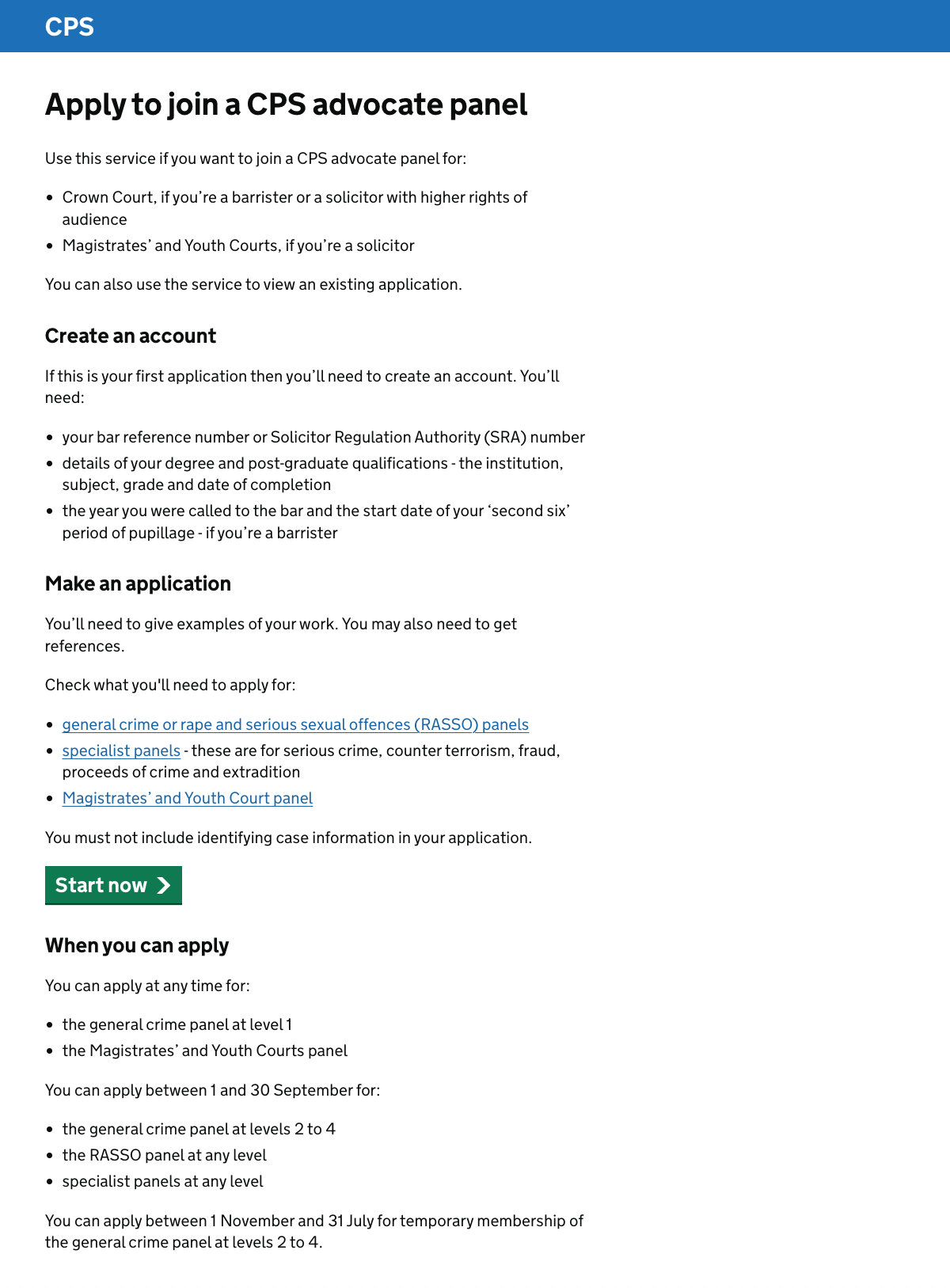
Under ‘Make an application’ we link to guidance for different panels, since there’s too much information to include on this page.
The current service instead links to a ‘useful links’ page which then links to guidance. We felt this added an unnecessary step.
Some of the information which we link to is also included within the prototype, such as the guidance about what to include when answering specific questions.
Further considerations
We should:
- look at how the start page connects to the CPS website
- improve the content about when to apply
- consider the location of the content about when to apply
- reflect any exceptions to the usual application process
Connecting the start page to the CPS website
We’ve tried to avoid duplicating content from the CPS website on the service start page.
Where there’s duplication, it’s because we felt that the content could be helpfully gathered together. For example, the information about application windows is all on the CPS website but not all in the same place.
We should look further at what information belongs on the CPS website and what belongs in the service.
This should include exploring whether we could remove this start page. Users could instead go straight into the service from the CPS website.
This kind of change should be part of broader work to streamline and improve the CPS website content.
Improving the content about when to apply
The information about application windows in the prototype has been simplified. For example it does not mention that London secondees can apply outside the usual window.
We should improve this content. We may also consider whether the content on the page should change throughout the year, to reflect whether application windows are open or closed.
Location of the content about when to apply
The section about when users can apply was added late in the design process. We placed it below the start button because we think that most people arriving at the start page will:
- know when they can apply
- be ready to apply
In the next round of research we should test whether these assumptions are correct.
Exceptions to the usual application process
The application process is different for level 3 and 4 general crime panel members who want to join the rape and serious sexual offences (RASSO) panel.
These applicants do not need to submit a written application or reference. They instead need to contact the CPS by email.
We should work out how to reflect this, as well as any other exceptions to the usual application process. We might decide to:
- include content on this page
- tell users about the different application process if they make the appropriate choices within the service