Work examples tasks
This design history entry is about a set of similar tasks which appear in the application form task list.
All applicants will need to complete several work example tasks. The tasks which appear depend on:
- panel
- level
- whether the user is making a new application to a panel or upgrading from a lower level in that panel
We initially designed the prototype to work for:
- general crime level 1, which is inherently a new application since it’s at the lowest level
- general crime level 4, upgrading from level 3
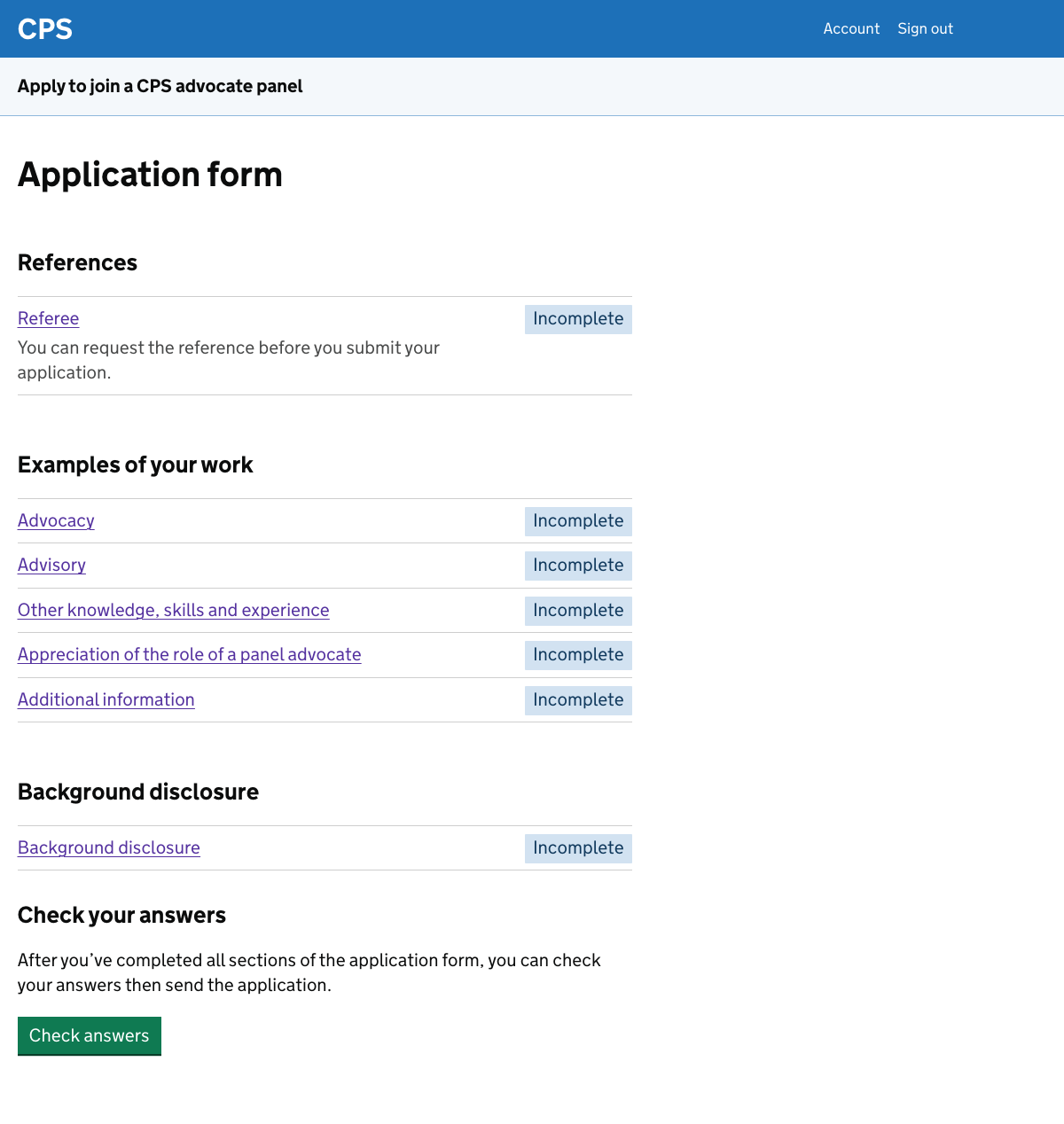
For general crime level 1, the work example tasks are:
- advocacy work
- advisory work
- other knowledge, skills and experience
- appreciation of the role of panel advocate
- additional information
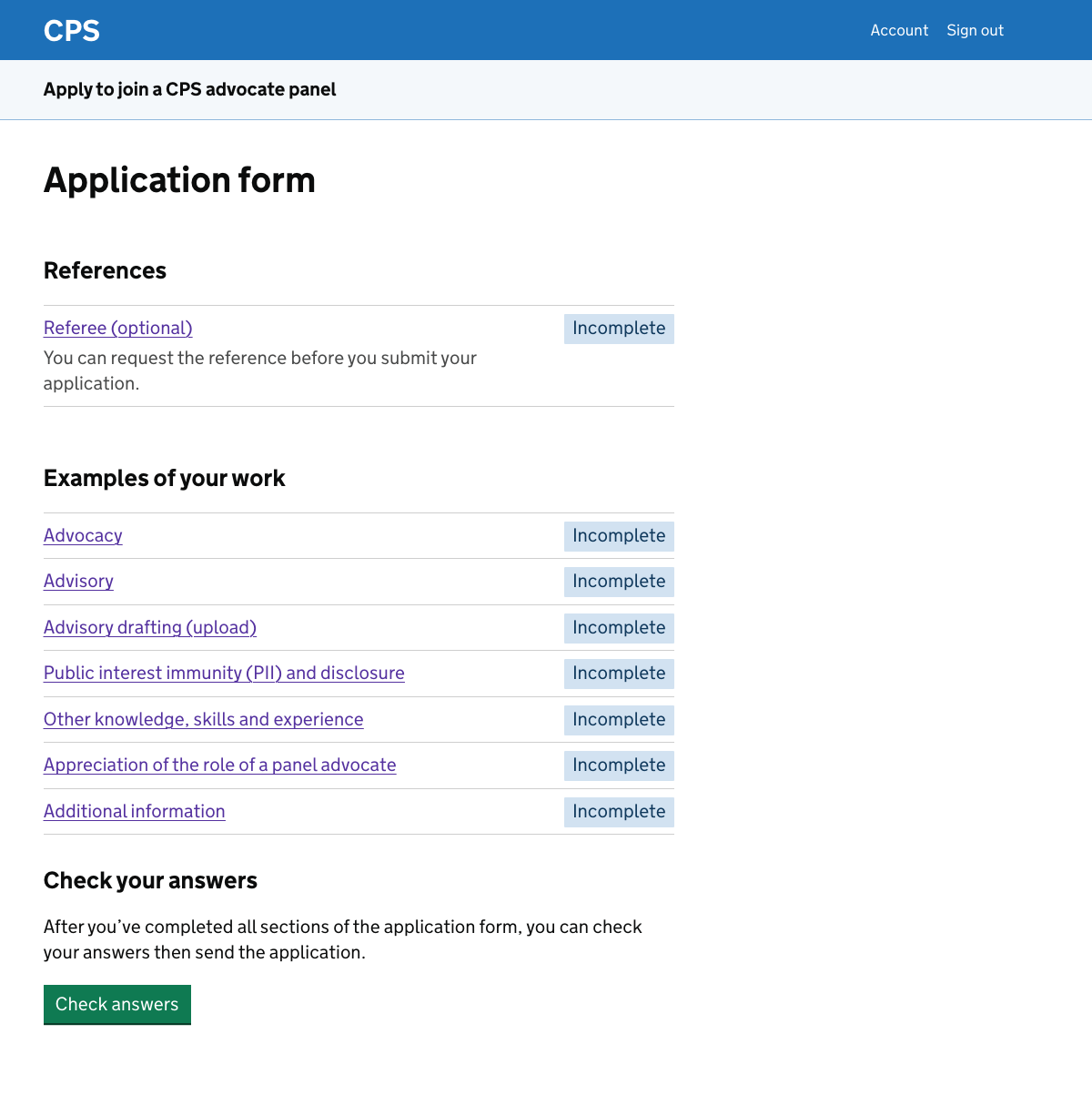
For general crime level 4 upgrade, there are additional tasks for:
- public interest immunity and disclosure
- uploading an example of advisory drafting - there’s a separate design history entry about this
What the work example tasks have in common
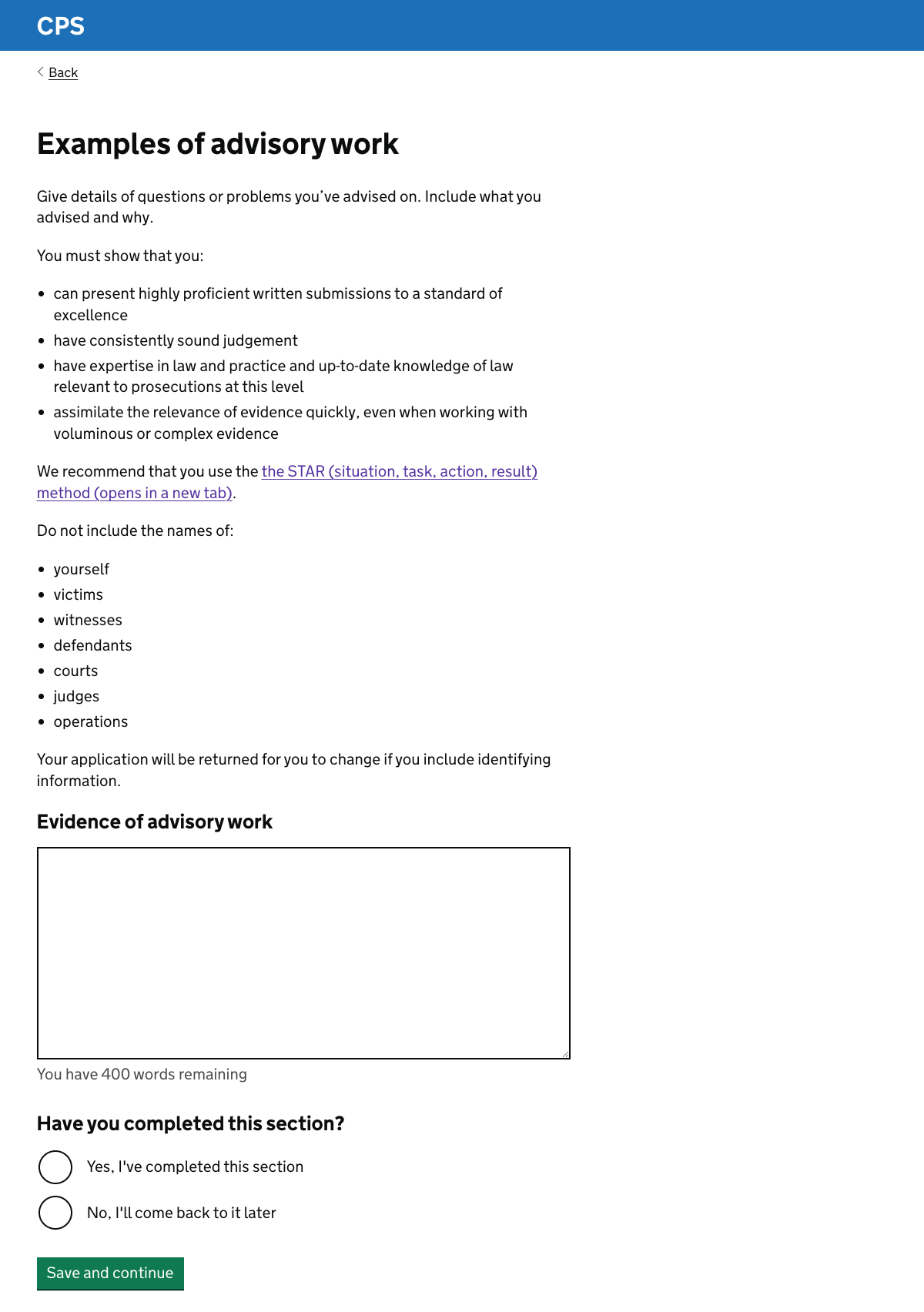
All the work example tasks follow the same pattern:
- guidance about what to include and how to write it
- a recommendation to use the STAR (situation, task, action, result) method
- a reminder not to include identifying information
- a textarea for the user to add their work examples
- a question asking the user whether they’ve completed the section
The guidance varies according to the panel and level. The other elements of the pattern do not.
This screenshot shows a task asking for examples of advisory work for a general crime upgrade to level 4.
Guidance about what to include and how to write it
Rather than including guidance within the application form, the current service has links to the CPS website.
The guidance for a particular task is typically within an accordion component which is part of a longer page. We know from research that some users miss the link, while others found the guidance hard to follow.
In the new design we have taken the most important guidance and put it directly in each task.
This is assisted by the use of a task list pattern, which means that the user only sees the guidance for the task which they’re completing.
The guidance is taken largely from the current CPS website with some reformatting and light editing. There was not enough time to do a more complete rewrite.
The research we carried out with the prototype suggests that users would find it useful to have the guidance within the task.
Recommending the STAR method
Every work example task mentions the STAR method, which is CPS’s recommended way to structure examples. There’s a link out to a National Careers Service page explaining how it works.
Several participants mentioned the STAR method in the discovery research. One said they believed they had failed their first application partly because they did not know about the method. They reapplied using the STAR method and were successful.
Another said that they thought of the STAR method as a ‘civil service thing‘ which they wouldn’t normally use elsewhere.
The method is mentioned in guidance on the CPS site. Some research participants had seen it while others had heard about the method from colleagues.
We do not want users to fail because they did not know how to structure their examples.
We mention the STAR method in every relevant task because we do not know which task the user will complete first.
Reminder not to include identifying information
Every work example page includes a list of the types of identifying information that must not be included in examples.
We know from CPS administrative staff that a very high percentage of applications are returned because they contain identifying information that needs to be redacted. Applications are sometimes returned multiple times.
This has been a particular issue since the rules were recently made stricter.
We give this reminder on every page because we do not know which task the user will complete first.
Free text area
The user has to enter up to 400 words for each task. They enter it into a textarea using the standard character count component from the GOV.UK design system
The current service uses a rich text editor called CKEditor. It which offers a wide range of formatting options including headings, font sizes and other styling tools.
We know that many users write their examples in Word first and then paste them in, keeping formatting such as bold and bullets. Some also use the CKEditor panel to add further formatting.
This helps users to structure their examples but we know from CPS administrative staff that it can also cause problems. Applications look like they’ve been formatted correctly when submitted, but by the time they have been redacted and passed to assessors the formatting is often broken and hard to read.
In the prototype we’ve not offered formatting options. This is the default for the design system component and requires no additional configuration.
Checking whether the user has completed a section
Each work example task ends by asking whether the user has completed the section. This is because we cannot tell from the content alone whether a user has finished.
A user who has entered 300 words might intend to come back and add more, or they might have finished. Asking explicitly allows the user to mark the task as complete or save it as in progress.
If the user selects “no, I’ll come back to it later” then the task is tagged as ‘in progress’ on the task list. If they mark it as complete then it’s tagged as ‘completed’.
Further considerations
We should:
- investigate how well the tasks meet requirements
- consider whether the word count is always suitable
- explore requirements for text formatting
- improve the quality of the guidance
- consider how to improve the process for updating content
- explore the use of the additional information task
Investigating how well the tasks meet requirements
We learned about users’ views of some of these tasks during research. We also spoke to CPS administrative staff.
We have some comments from assessors but did not speak to them directly. We should do so, to ask about topics such as:
- common weaknesses in applicants’ answers
- whether they could better assess applications if tasks were added, changed or removed
Tasks which we already know cause some problems include:
- appreciation of the role of panel advocate - research participants were not always sure what was expected of them in this task, and some assessors have recommended removing the question
- public interest immunity and disclosure - research participants said that people at lower levels often have limited direct experience of this area of work, but the guidance does not acknowledge this
Consider whether the word count is always suitable
In research we found that participants found the standard 400 word limit restrictive. Some appreciated that being able to express themselves concisely is an important skill for panel members.
However we should consider whether the word count might be varied according to the task, panel or level.
For the counter terrorism panel, for example, an assessor suggested increasing the word count limit as well as reviewing the assessment criteria.
Exploring formatting requirements
We started with no formatting options so that we could observe whether this is acceptable.
In early research we did not see specific problems. One participant, for example, adapted naturally by using dashes instead of bullets and paragraph breaks instead of bold for headings. They noted that this would be fine as long as the dashes did not count towards the word count.
We should gather more evidence from user research.
If we think that users need some formatting, such as bold and bullets, then we could consider adding a more limited rich text editor.
We should speak to assessors about what they find easiest to read before committing to a final approach.
Improving the guidance
The guidance has been taken from the current CPS site with minimal changes. It could be more clearly worded.
A content design review would help ensure users are being given accurate and helpful guidance. We should also check whether the guidance is up to date.
Considering how to improve the process for updating content
Part of the reason for guidance being on the CPS website currently is that it’s harder to update the service than the website.
We should investigate the reasons for this and propose ways to ensure that content in the service can easily be updated.
Use of the additional information task
This task allows applicants to include anything that does not fit neatly into the other sections.
In research, one participant said she welcomed the space and had several things she wanted to include, such as involvement in a documentary.
The current service sometimes directs users completing other parts of the application form to add specific information in this task. We would prefer to avoid that, since it would require the user to:
- leave the task they’re in, which has told them to add to the additional information task
- go to the additional information task, possibly through a direct link
- add what they’ve been asked to include
- decide what to do next - return to the original task, start a new one or add more to the additional information task
It’s likely to be better to add a field to the original task to gather additional information there. We have not yet explored this in the prototype.