Redesigning the task list
The task list allows case work assistants, paralegal officers and prosecutors to process and progress cases.
The current task list has many problems:
- it is not responsive, making it hard to use on smaller screens
- dates do not follow GOV.UK style, making them hard to read
- icons are used which are harder to use and unnecessary
- filters are hidden behind dropdowns, which have multiple downsides
- information is buried inside nested accordions, including empty fields that waste space
- the language is confusing, for example “escalated” means “very overdue” but does not say that
- users can only see one unit at a time, even though users work across multiple units
- tabs split the same list into separate views, fragmenting the user’s workflow
- the page heading says “Hi [name]” rather than describing what the user is looking at
Many users maintain their own spreadsheets outside the system because the task list does not support their needs well enough. This negatively impacts how quickly cases are processed and the operating costs of the service.
Many of these issues were flagged in the last service assessment and we committed to improving them.
So we redesigned the task list to address these problems.
How it works
When users first go to the task list, it’s pre-filtered to show only tasks they’re assigned to.
Tasks are grouped by severity so the most urgent work is always at the top:
- Critically overdue
- Overdue
- Due soon
- Not due yet
Each task shows:
- task name (as a link)
- urgent tag (where applicable)
- URN
- operation name (where applicable)
- defendant
- due date
- custody time limit (where applicable)
- statutory time limit (where applicable)
- PACE clock (where applicable)
- reason for marking as urgent (where applicable)
- owner
- unit
- reminder type (where applicable)
- latest note (where applicable)
- hearing date and type (where applicable)
We only show fields that have values, so there are no empty rows.
Dates are shown with a bracketed status to help users judge urgency at a glance. For due date, custody time limit, statutory time limit, and hearing date:
- past dates show “(overdue)”
- a date that falls today shows “(today)”
- a date that falls tomorrow shows “(tomorrow)”
- dates further ahead show the number of days remaining, for example “(4 days)” or “(11 days)”
Due dates can also show “(critically overdue)” for tasks that are significantly past due.
The PACE clock is measured in hours:
- “(expired)”
- “(ends in less than 1 hour)”
- “(ends in less than 2 hours)”
- “(ends in less than 3 hours)”
- “(ends in more than 3 hours)”
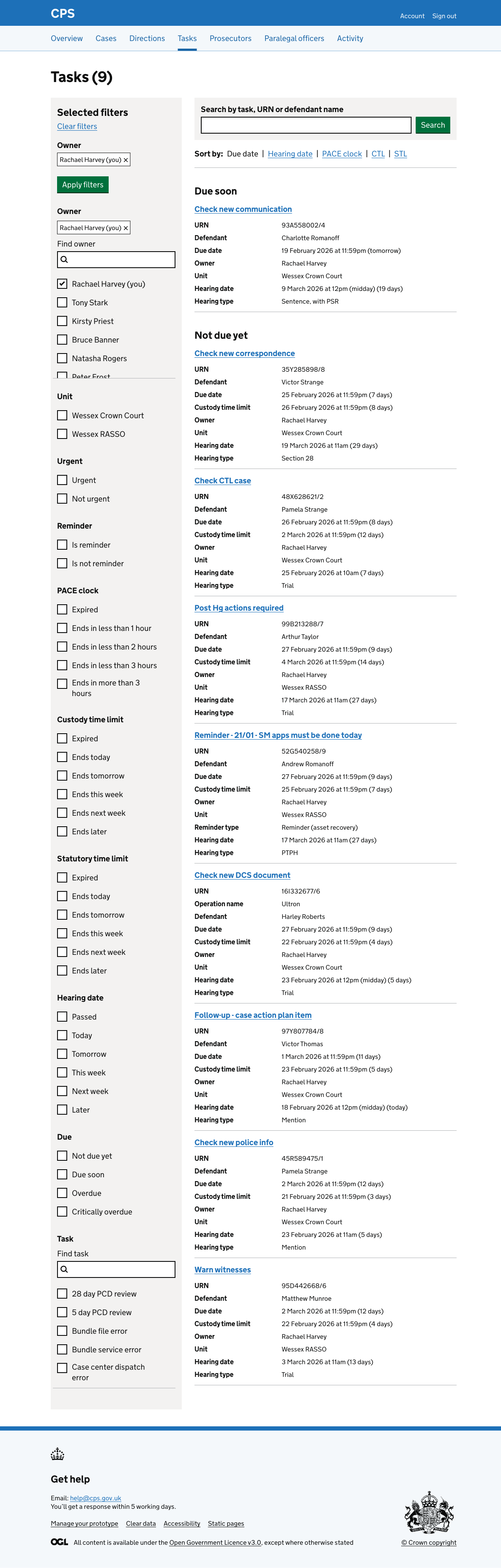
The selected owner filter appears at the top of the filter panel as a tag with a remove link. A “Clear filters” link is available to remove all active filters at once.
When filters are cleared, the full list of tasks across all units is shown.

Filters
The filter panel is shown on the left side of the page.
Users can see and change filters without having to expand menus.
There are 11 filter groups:
- Owner - searchable list of users and teams (admin pools) visible to the signed-in user
- Unit - the units the user belongs to
- Urgent - filter by urgent or not urgent
- Reminder - filter by whether a task is a reminder
- PACE clock - filter by time remaining on the PACE clock
- Custody time limit (CTL) - filter by when the CTL expires
- Statutory time limit (STL) - filter by when the STL expires
- Hearing date - filter by when the next hearing is
- Due - filter by when it’s due
- Task - searchable list of all task types
The owner filter includes both named users and team pools - for example, ‘Admin pool (North Yorkshire Magistrates Court)’. This means users can filter to work that is assigned to a shared pool, not just an individual.
When filters are applied, the selected values appear as tags at the top of the filter panel with individual remove links. Users click “Apply filters” to submit the form.
Search
A search form above the results lets users search by task name, URN, or defendant name. This is useful when users know what they are looking for.
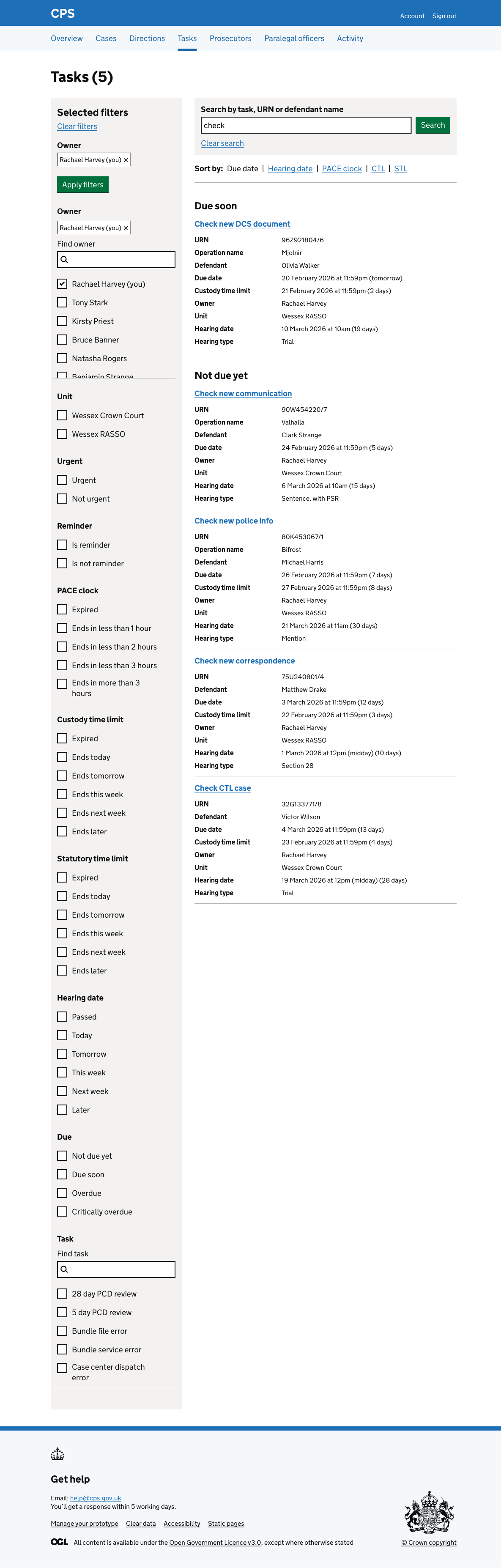
Sort options
By default tasks are sorted by due date and grouped by severity. Users can change the sort to prioritise different types of urgency.
Hearing date groups tasks by when the next hearing is:
- Overdue
- Today
- Tomorrow
- This week
- Next week
- Later
- No hearing date

PACE clock groups tasks by how long the police can hold someone in custody before charging them:
- Expired
- Less than 1 hour
- Less than 2 hours
- Less than 3 hours
- More than 3 hours

CTL (custody time limit) groups tasks by when the defendant’s custody time limit expires:
- Expired
- Today
- Tomorrow
- This week
- Next week
- Later

STL (statutory time limit) groups tasks by when the statutory time limit expires, using the same groupings as CTL:
- Expired
- Today
- Tomorrow
- This week
- Next week
- Later

Casework assistants
Casework assistants do not own tasks in the same way as prosecutors and paralegal officers.
They work from shared admin pools rather than being assigned tasks individually.
When a casework assistant visits the task list, the default filter is set to their own name - but because they have no tasks assigned to them, they won’t see any tasks:
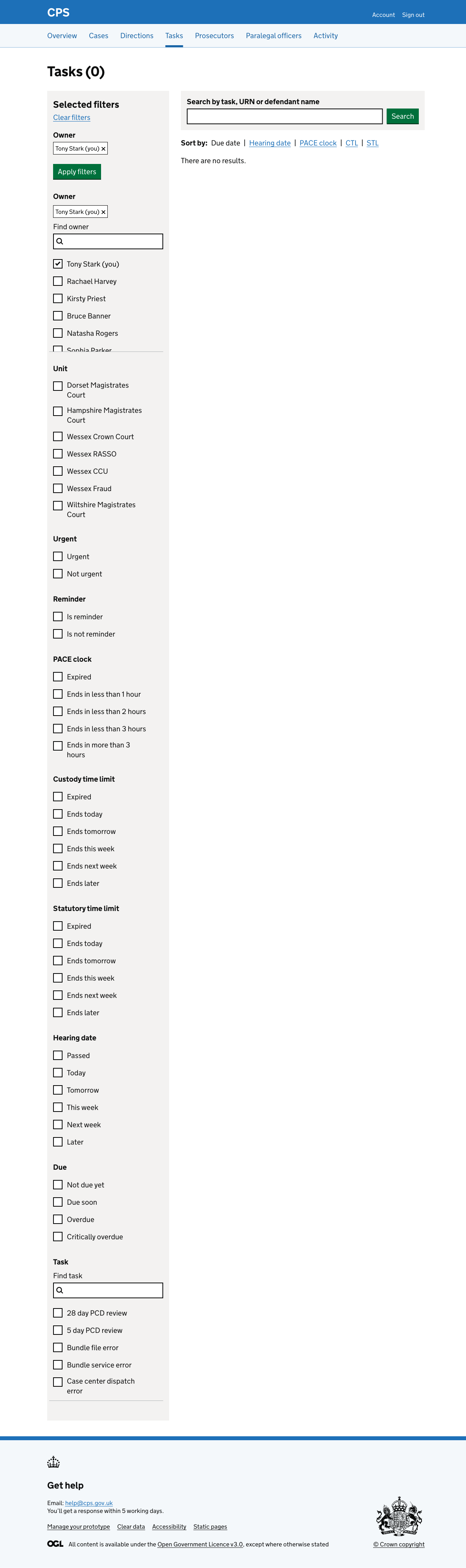
So they must change the owner to an admin pool to see the work relevant to them.
Prosecutors see the same default behaviour as paralegal officers - the list is pre-filtered to their tasks.
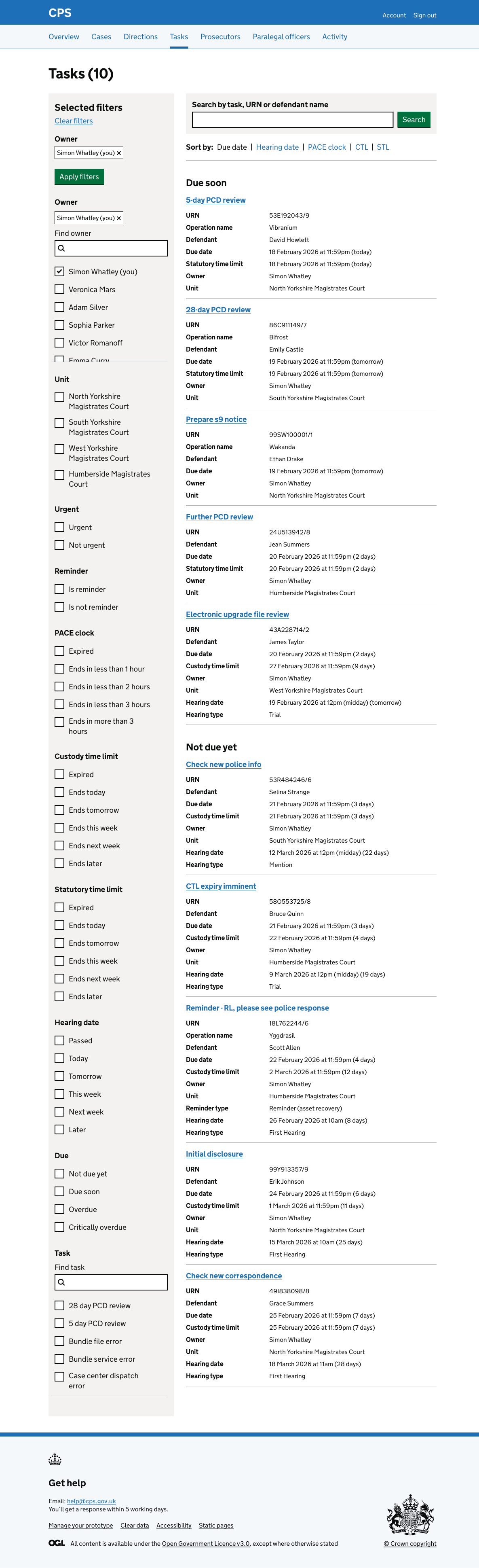
Pagination
Results are paginated at 25 tasks per page.
The total number of matching tasks is shown in the page heading, for example “Tasks (593)”.
Future considerations
Replacing tasks with a state machine
The current task model has limitations.
Tasks are created manually or by the system and assigned to individuals or teams, but there is no structured relationship between a task and the state a case is in. This means the task list shows what people have been asked to do, but not necessarily what needs to happen next in the case.
We would like to consider a model to replace tasks with a case state machine, where each case moves through defined states, for example:
- ready for triage
- ready for review
- ready to assign
This would make it clearer what action is needed at each stage and reduce the need for manual task management.
This is a significant change that would require rethinking the underlying data model and would go beyond the scope of this iteration.
Merging task due dates into one field
Tasks currently have three separate due dates:
- reminder date
- due date
- escalation date
Each one triggers a different severity state.
To understand why a task is in a particular group, users would need to know that tasks have three separate dates and that crossing each one changes the task’s status.
We think it would be clearer to have a single due date, with urgency calculated automatically based on how many days remain.
Users would only need to understand one concept - when the task is due - rather than a set of thresholds they cannot easily see or understand.