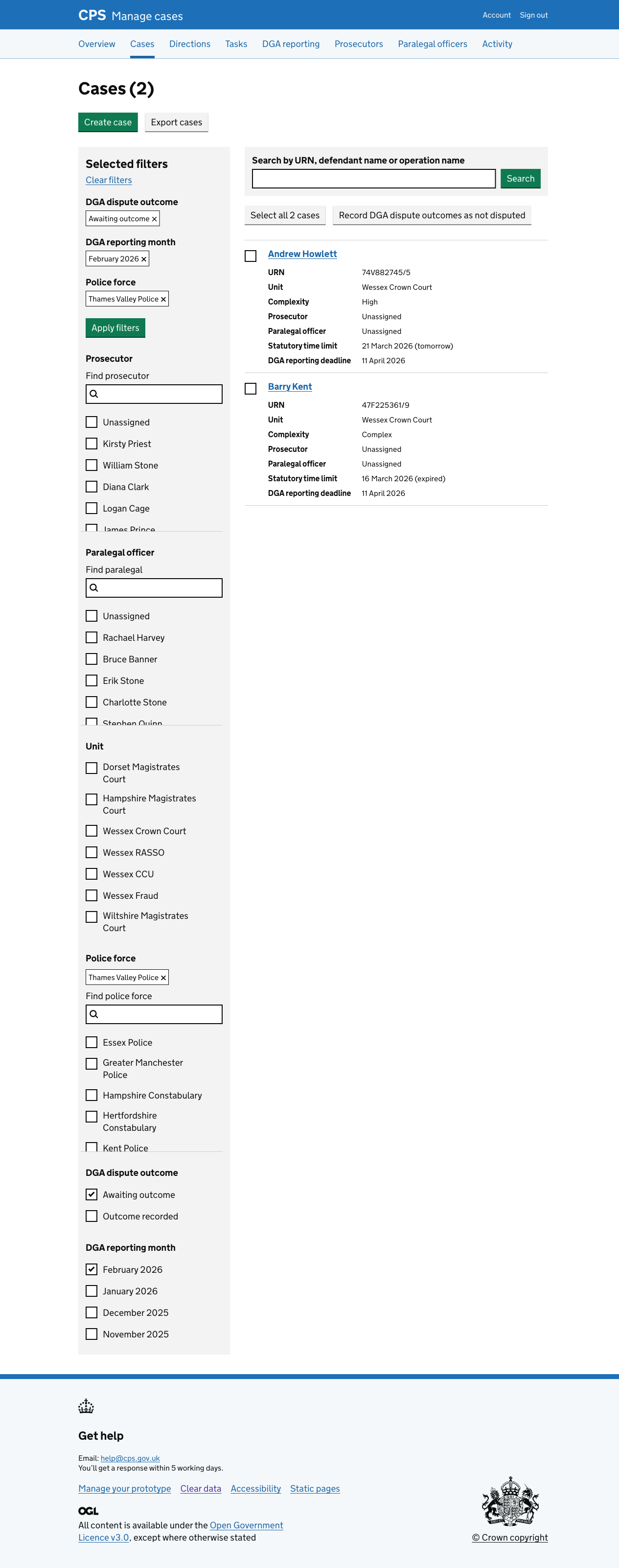
Using the case list to find cases with DGA outcomes that need to be recorded
Previously, the DGA reporting section contained its own case list for each police unit and month.
We’ve changed to using the main case list, adding DGA-specific filters and actions.
This means users find and work on DGA cases in the same place they work on all other cases.
How it works
DGA filters
We added two new filter groups:
- DGA dispute outcome - filter by “Awaiting outcome” or “Outcome recorded”
- DGA reporting month - filter by the reporting month, for example, February 2025
Users can apply these filters manually, or arrive with them pre-selected by clicking a “Record dispute outcomes” button from the DGA reporting month page.
When coming from the month page, the case list is filtered by police force, reporting month, and outcome status.
Cases with a DGA dispute outcome show the DGA reporting deadline, so users can see when outcomes need to be recorded without leaving the case list.