Comparing documents side by side
We added a “view in new window” option to materials to help users compare documents side by side.
This change responds to user feedback that the existing preview and tab views do not support comparison effectively.
Context
Users review multiple documents as part of casework. This often involves:
- comparing versions of the same document
- cross-referencing statements with case summaries
- checking details across different evidence files
Before this change, users could:
- preview a document within the service
- open multiple documents in separate tabs
These options limited users’ ability to view two documents at the same time.
Problem
Users could not easily compare documents side by side.
This introduced friction in a main task and increased time spent reviewing materials.
User needs
Users need to:
- view more than one document at the same time
- compare content without interrupting their workflow
- move quickly between documents during review
Design decision
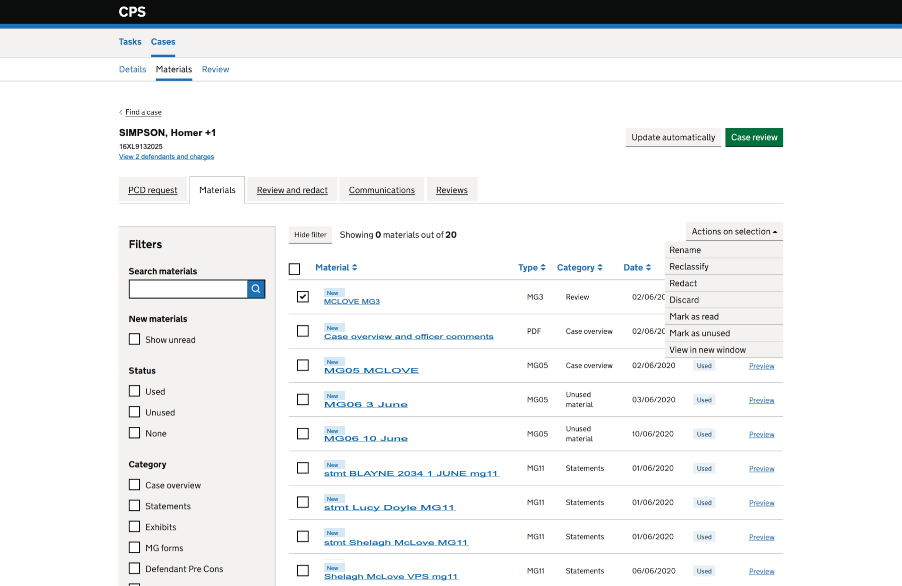
We introduced a “view in new window” action within the materials table.
This:
- opens the selected document in a separate browser window
- allows users to position documents side by side
- keeps the main case view available for navigation, so users do not need to leave the materials list and then return and find where they were
We have not limited the number of documents a user can open in new windows. This allows us to understand user behaviour before introducing restrictions that could prevent valid use cases.
We added the action to the existing “Actions on selection” menu to:
- avoid adding visual noise to the screen
- keep all document-level actions in one place
- support bulk selection patterns already used in the service
Outcomes
The “view in new window” action enables users to:
- compare documents more efficiently
- reduce context switching
- maintain their position in the case
Early feedback indicates improved usability for document review tasks.
Risks and considerations
Allowing multiple windows may become difficult to manage, especially if users open many documents. This may affect users’ ability to manage their workspace effectively.
There are also potential accessibility and usability impacts. Managing multiple windows can be challenging for some users, including those using assistive technologies. Users may lose track of open documents, which could cause confusion or frustration.
We have identified this as a known potential issue and will continue to monitor it.
Next steps
We will gather further feedback and observe how users interact with multiple open windows.
If this approach causes problems, we will explore alternatives. This may include limiting the number of open documents or improving ways to compare and manage documents within a single view.